
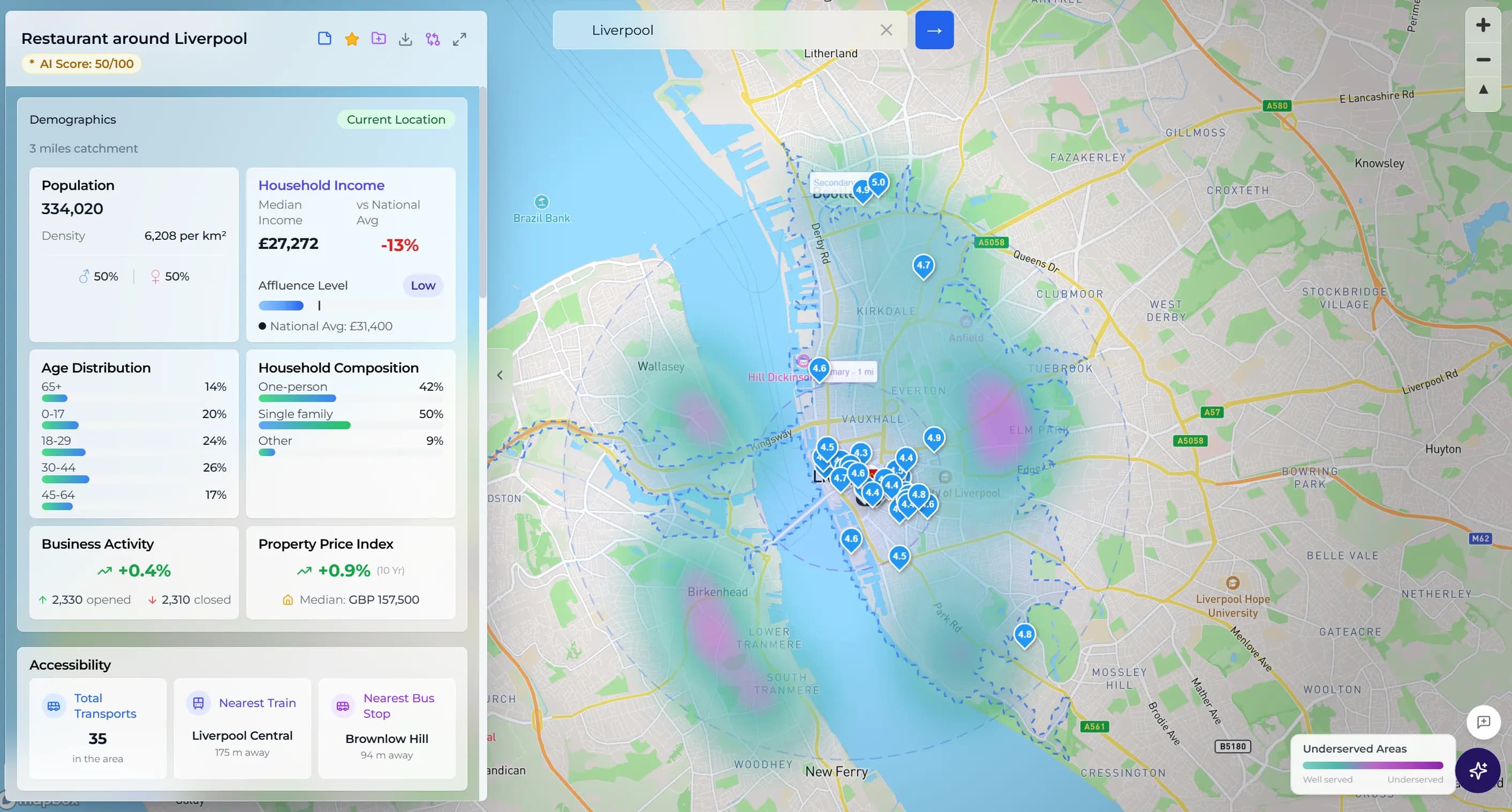
Best Location Analytics Platform for Site Selection: A Buyer's Guide
Compare the capabilities a location analytics platform needs for site selection: demographics, competitors, foot traffic, catchments, scoring, and reports.
Sara
Head of Growth
A location analytics platform helps businesses make decisions based on where customers, competitors, demand, and risk exist in the real world. The best platforms turn maps, demographics, foot traffic, and competitor data into a clear decision: where to open, where to expand, which site to avoid, and what to monitor after launch.
For a retail operator, restaurant group, franchise team, or commercial real estate advisor, location analytics is not just map software. It is the evidence layer behind expensive location decisions.
Location analytics, software, and platforms: what is the difference?
Location analytics is the practice of turning place-based data into business decisions. Location analytics software is the tool used to collect, map, and analyse those signals. A location analytics platform goes further by combining the workflow: address search, catchment context, competitor mapping, demographics, foot traffic, scoring, comparison, and report-ready outputs.
That distinction matters for site selection. A dashboard may show that an area has strong demand, but a platform should help a team decide whether a specific site fits the business model, whether the evidence supports the rent, and whether the recommendation can be explained in a stakeholder report.
What is a location analytics platform?
A location analytics platform is software that combines geographic data with business data to reveal patterns by place. It may show where customers live, how far they travel, where competitors cluster, how busy an area is by hour, or which trade areas are underserved.
The key word is "analytics." A map tells you where things are. A location analytics platform helps explain what those patterns mean for a decision.
For example, a map can show ten coffee shops near a candidate unit. Location analytics should go further and help answer:
- Is that area saturated or does clustering increase demand?
- Do the surrounding demographics match the concept?
- Is foot traffic strongest during the daypart the business needs?
- Would a new site cannibalise an existing one?
- Can the evidence be turned into a report for approval?
That difference matters because most bad site decisions are not caused by missing a pin on a map. They are caused by reading local signals separately instead of comparing them in one decision framework.
How is location analytics different from GIS?
GIS is the broad technical category for managing, analysing, and visualising geospatial data. It is powerful, flexible, and often essential for analysts, planners, and enterprise data teams.
A business location analytics platform is narrower. It packages the spatial analysis around commercial decisions: site selection, trade area analysis, competitor mapping, territory planning, local marketing, and performance monitoring.
The practical difference is the user. A GIS analyst may want full control over layers, joins, projections, and modelling methods. A franchise development manager usually wants to compare five candidate territories and explain the recommendation to a board. A commercial real estate advisor wants to show why one tenant type fits a unit better than another. A founder wants to know whether a lease is worth the risk.
Neither approach is better in every case. The right choice depends on whether your team needs a custom geospatial workbench or a faster decision workflow.
What data should a location analytics platform include?
For site selection and expansion decisions, the platform should combine at least six categories of data.
Demographics
Demographic analysis shows whether the people around a site match the target customer. Useful fields include population, age, income, employment, household type, and local density.
For UK decisions, ONS Census data can support local population and household analysis. For US decisions, Census ACS data can support tract-level demographics. For broader global screening, population datasets such as WorldPop can estimate catchment size, although income and household data may not be equally available in every country.
The platform should make these limits clear. "Global coverage" is only useful if users know which data points are global and which are country-specific.
Competitors
Competitor mapping should identify nearby direct and adjacent competitors, not just plot every business in an area. A gym, pharmacy, cafe, and quick-service restaurant each need different competitor definitions and catchment assumptions.
A useful platform should show competitor count, distance, rating, review volume, opening status, and ideally the pattern of clusters and gaps. The question is not simply "how many competitors are nearby?" It is "does the local market have enough demand to support another operator?"
For exact site checks, this is where competitor proximity analysis matters. A franchise team may see strong city-level demand, but the approval decision depends on how close the nearest comparable operators are, whether they serve the same audience, and whether the catchment has enough demand to absorb another location.
Foot traffic and activity
Foot traffic analysis matters because demand changes by day and hour. A site that is busy on Saturday afternoon may be weak for a weekday breakfast concept. A lunch operator needs daytime worker activity. A family restaurant may care more about evening and weekend flows.
Look for hourly or daypart-level activity signals, not just a broad busyness score. If the platform only says a place is "high traffic," it is not enough to judge concept fit.
Catchments and trade areas
A trade area is the zone from which a location draws customers. Fixed-radius circles are a useful first view, but they can be misleading. Real catchments are shaped by walk times, drive times, public transport, barriers, local habits, and the business type.
The best location analytics workflows let you compare catchments, not just addresses. For a deeper breakdown, see how trade area analysis defines reachable demand before a site-selection decision. That is especially important for franchise territories and multi-site operators, where overlap can create cannibalisation risk.
Site comparison
Location decisions rarely involve one site. Teams compare two, three, or twenty possible locations.
A good platform should let you score each candidate against the same criteria: customer fit, competition, access, demand, and risk. This keeps the discussion consistent and stops the team from over-weighting whichever site has the most compelling story.
For a practical first pass, use a weighted scorecard rather than a single headline score. The weights below are an illustrative starting point, not a universal formula; a breakfast-led coffee concept, a destination restaurant, and a commercial property recommendation should not value the same signals equally.
| Decision factor | Example starting weight | What to test |
|---|---|---|
| Customer and demographic fit | 30% | Do the people and households in the catchment match the concept? |
| Catchment and access | 25% | Can the intended customers reach the site by the relevant walking, driving, or travel-time route? |
| Competitive position | 20% | Is the site exposed to direct competition, or does the cluster reveal a defensible gap? |
| Activity and demand signals | 15% | Do footfall or local activity patterns support the hours and dayparts that matter? |
| Risk and evidence quality | 10% | Are the assumptions, source dates, and trade-offs clear enough to defend? |
Score every candidate against the same definitions, record the reason for each rating, and review the result against the underlying evidence. That makes the recommendation easier to challenge and reduces the risk of choosing a site because one attractive metric hides a weaker catchment or access pattern.
Reporting and decision support
The final output should be easy to share. A dashboard is useful for analysis, but a decision often needs a PDF report, shortlist memo, or approval pack.
This is where AI can help if it is grounded in visible evidence. The useful version of AI does not say "open here" without explanation. It summarises the signals, highlights trade-offs, and points out risks a human should review before committing.
What should buyers ask before choosing a platform?
Use this checklist when comparing platforms:
- Does it analyse exact addresses, or only broad markets?
- Can it support your specific business type?
- Which demographic sources does it use in your country?
- Can it map competitors by category and quality, not just proximity?
- Does it show hourly or daypart activity signals?
- Can it model walk-time, drive-time, or realistic catchment areas?
- Can it compare multiple sites side by side?
- Does it explain the score, or only show charts?
- Can non-technical users operate it without GIS training?
- Can the output be shared with investors, franchisees, clients, or property teams?
If the answer to most of those questions is no, you may be looking at a mapping tool rather than a true location analytics platform.
How to choose the best location analytics platform for retail networks
The best location analytics platform for a retail, restaurant, or franchise network is the one that turns site data into a repeatable approval workflow. It should help your team compare candidate locations using the same criteria every time: customer fit, catchment strength, competitor density, foot traffic pattern, site risk, and report-ready evidence.
For multi-location teams, look for three practical signals. First, the platform should support exact-address checks, not only broad market dashboards. Second, it should explain why one site scores better than another, so property, operations, and finance teams can challenge the recommendation. Third, it should produce outputs that can be shared with stakeholders without exporting raw GIS layers or rebuilding the analysis in slides.
If you are comparing location analytics platforms for retail networks, the buying question is not "which map has the most layers?" It is "which workflow helps us make better site decisions faster, with evidence we can defend?"
If you already have an address to test, start with a location analyser for business site checks before committing to a longer shortlist. The useful next step is not another map layer; it is a consistent view of the catchment, competitors, demographics, and demand around the exact site.
How franchise teams use location analytics to read customer buying patterns
Franchise teams use location analytics to connect customer buying patterns with the local catchment. The useful signals are not only where people live, but when they visit an area, which nearby operators already serve the same need, whether reviews suggest unmet demand, and whether a proposed site fits the daypart the concept depends on.
For example, a coffee franchise may need commuter-morning demand, short walking distance from offices or stations, and enough spacing from similar cafes. A fitness franchise may care more about residential density, evening access, parking, and the difference between budget gyms and boutique studios. The platform should make those customer-pattern differences visible before the team approves a territory or lease.
That is why franchise location analytics should combine customer fit, competitor density, catchment strength, foot traffic timing, and report-ready evidence in one workflow. If the tool cannot explain how those factors change the buying pattern for a specific concept, it is still only a map.
Which teams benefit most from location analytics?
Location analytics is useful anywhere physical place affects revenue, risk, or service delivery. The strongest business cases are usually in four groups.
Retail and restaurants use location analytics to choose sites, understand catchments, compare foot traffic, and avoid areas where demand is already saturated.
Franchise teams use it to evaluate territories, reduce cannibalisation, and give franchisees a repeatable approval process.
Commercial real estate advisors use it to make property recommendations more credible. A unit becomes easier to position when the advisor can show nearby demand, competitor gaps, and tenant fit.
Operating business owners use it after opening to monitor competitor changes, reviews, market position, and local demand shifts.
The same platform can support the full lifecycle if it covers both pre-decision site selection and post-opening market monitoring.
How Locus fits the category
Locus is a self-serve location analytics platform built for business location decisions. It combines address search, competitor mapping, demographics, catchment context, foot traffic signals, location comparison, and AI-generated location assessment in one workflow.
For a founder, that means checking whether a site is viable before signing a lease. For a franchise or retail team, it means comparing candidate locations with the same criteria. For a CRE advisor, it means turning location evidence into a clearer client recommendation.
Locus is not trying to replace full GIS platforms for specialist spatial analysts. It is designed for teams that need location intelligence software they can use quickly, explain clearly, and connect to real business decisions.
The bottom line
A location analytics platform should do more than visualise points on a map. It should combine demographics, competitors, foot traffic, catchments, site comparison, and decision support so your team can make better location decisions with less manual research.
Choose a GIS platform if you need full geospatial modelling control. Choose a self-serve location analytics platform if you need to evaluate business locations, compare sites, and explain the recommendation without weeks of setup.
Analyse any business location in Locus → open the Location Analyser
Keep reading
Related guides from the Locus library.
AI-Powered Location Intelligence for Local Business Growth
How Locus brings competitor mapping, demographics, foot traffic, catchment analysis, local reputation tracking, and AI recommendations into one practical workflow.
How AI is Revolutionizing Location Intelligence for Businesses
Discover how artificial intelligence is transforming business location decisions. Learn about AI-powered site selection, predictive analytics, and automated insights.